FreeBSD 15.0 RELEASE has landed!

BeastieFreeBSD 15.0: Notable Improvements for Desktop and Laptop Users


FreeBSD 15.0 introduces a range of updates that strengthen the system’s usability on desktops, laptops, and general-purpose machines. Several areas that matter most to daily users—networking, graphics, and desktop environments—see meaningful development in this release.

A key update is expanded WiFi support. FreeBSD 15.0 adds drivers for Realtek’s rtw88 and rtw89 chipsets, used in many current laptops. Intel iwlwifi support has also been refined, and the installation media now includes a dedicated WiFi firmware package, making it easier for a wider range of wireless adapters to function immediately after installation.

Graphics hardware support also advances. By incorporating newer Linux DRM driver code, FreeBSD improves compatibility and performance on modern Intel and AMD GPUs. This benefits both X11 and Wayland sessions, with smoother acceleration and more consistent behavior across display setups.

Desktop environments gain from this foundation. KDE Plasma, GNOME, Xfce and others continue to be available through packages, and improved hardware support helps these environments run more reliably. Work on a more desktop-friendly installer is ongoing and aims to simplify initial setup in future releases.

The system as a whole also receives updates. Optimized libc routines bring performance improvements on amd64, and various device drivers—covering networking, audio, PCI, and storage—have been updated for better compatibility and stability.

Taken together, these changes make FreeBSD 15.0 a solid release for users running the system on everyday hardware, offering broader support and a smoother experience across a wide range of setups.

Grab it now!
https://download.freebsd.org/releases/amd64/amd64/ISO-IMAGES/15.0/

Devuan 6.0 “Excalibur” Released – Your Systemd-Free Debian 13 System

init freedom

Less than three months after the official release of Debian 13 “Trixie,” the Devuan project has officially launched Devuan 6.0 “Excalibur” on November 2nd, 2025.

Excalibur brings all the benefits of Debian 13’s updated packages, modern kernels, and long-term support while staying true to Devuan’s systemd-free philosophy. The release ensures that alternative init systems like sysvinit and runit integrate smoothly, and existing Devuan users can plan upgrades with confidence.

For the Devuan community, this release represents a stable, up-to-date option for both new installations and older hardware users who want the reliability of Debian without systemd. If you’ve been waiting to move to a fresh, modern, yet systemd-free environment, Excalibur is ready to download and install.

Announcment: https://dev1galaxy.org/viewtopic.php?id=7507

Learn more and download: https://www.devuan.org/os/releases

Firefox Scrolling Inverted??

First time this has happened to me, but running the FireFox Nightly (which came on NetBSD 11 BETA) I noticed my TrackPoint \ middle mouse scrolling was reversed. I think they might call this “natural scrolling”… anyway, to fix it simply go to about:config in the title bar and search for mousewheel.default.delta_multiplier_y — Change it from 100 to -100 and presto, normal scrolling behavior.

OpenBSD 7.8 Released Today, /w Pi 5 Hardware Support!

OpenBSD 7.8, is another careful step forward that strengthens daily usability across laptops, desktops, and ARM64 systems. While this release isn’t radically new, the OpenBSD team continues to refine and expand their legendary system in all the right places.

The most visible change is Raspberry Pi 5 support. OpenBSD now boots cleanly on the Pi 5 with working SDHC storage, Ethernet, and Wi-Fi power management through new RP1 and sdhc drivers. That takes the board from experimental to genuinely usable. Additional ARM64 updates improve clock, PWM, and RTC support on newer SoCs, broadening the list of hardware that “just works.”

Power management on laptops sees steady progress. AMD systems handle S0ix suspend and resume more reliably, and the amdgpu driver now sleeps and wakes properly under S3. Laptops with GPIO-based lid sensors can suspend and resume cleanly, and hibernation reliability improves with better pre-allocation during boot. Small changes, but together they make OpenBSD behave more predictably on modern notebooks.

Networking performance benefits from new multicore TCP and IPv6 input handling, allowing up to eight threads to process traffic in parallel. Several core system calls, such as close() and listen(), were unlocked from global network locks, reducing contention on multi-CPU systems.

Graphics support advances with a DRM update based on Linux 6.12.50, improving amdgpu reliability and adding Qualcomm display controller support. Xorg remains the standard display server, while Wayland continues to function through XWayland and wlroots compositors for those who prefer a modern stack. In ports, GNOME 46 and KDE Plasma 6 are available, keeping desktop environments current alongside updated Firefox and Chromium builds.

The built-in hypervisor gains AMD SEV-ES support for encrypted guests, and the installer adds further safeguards and clearer defaults. Security hardening continues quietly across the base system, with more software adopting pledge and unveil.

OpenBSD 7.8 doesn’t chase trends, but it delivers a more capable, consistent, and secure system across a wider range of hardware. Whether on a modern laptop or a Raspberry Pi 5, this release shows the project’s continued focus on quality and correctness—hallmarks that keep OpenBSD in a class of its own.

https://www.openbsd.org/78.html

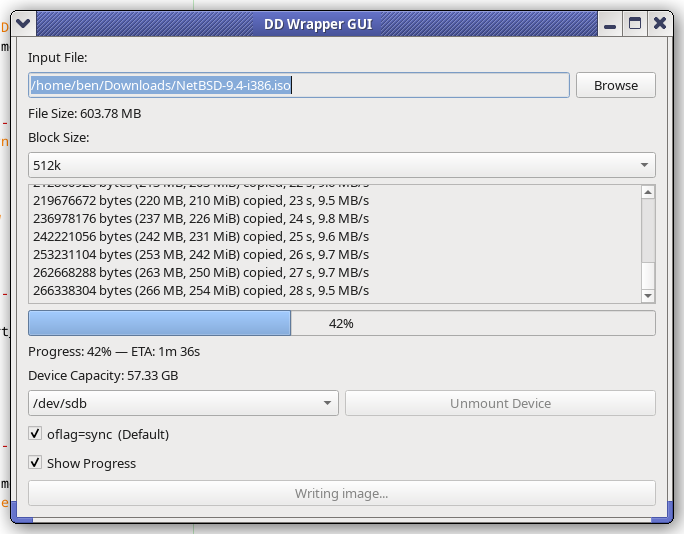
Writing a wrapper for DD

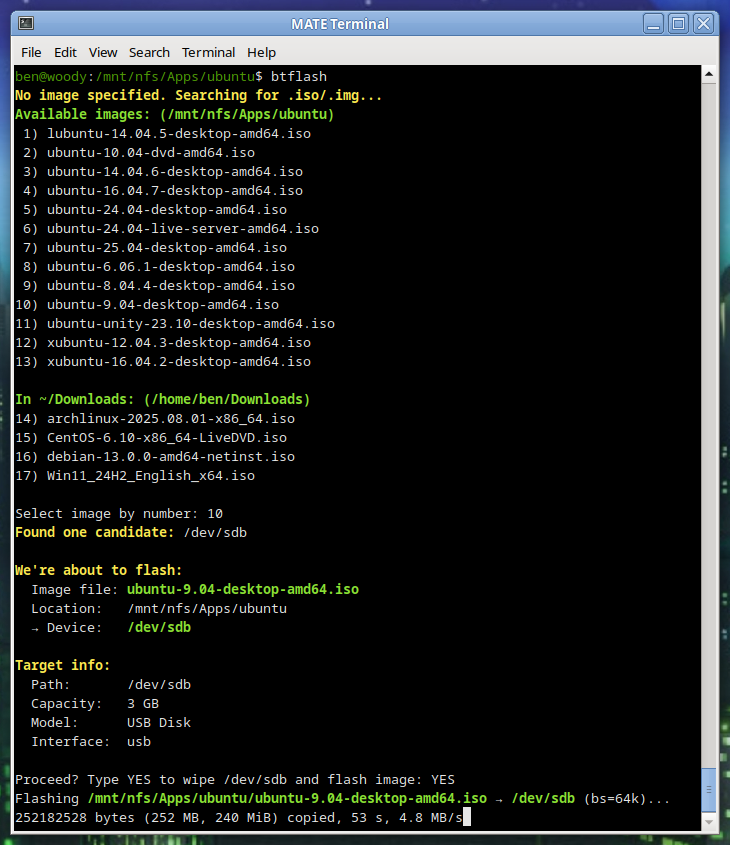
I’ve been working on a handy lil’ tool, basically a glorified wrapper script for dd. But I think I worked in some solid concepts:

You just run it, no args needed. (Though you can pass args if you want.)

Automatic target selection: Devices with the prefix /dev/sd* that are not mounted will be considered. I’ve put in a volume limit of 64 GB for safety. If the device is greater than 96 GB, then (imo) it’s probably something else – HDD/SSD – so in that case a manual override is required.

Automatic block size: Chosen based on drive capacity. Tiny drives use a smaller block size, while larger (likely more modern USB 3) drives can use big chunks, like bs=4M. This usually improves performance.

Once I get it all ironed out, I’ll share the code. So far, I find it pretty handy.

btflash in action…

Debian Trixie: Goodbye Init Freedom

With Trixie, comes changes…

systemd logo

As someone who has been running Debian servers for about a decade, one thing I’ve always appreciated is that if you didn’t like a core component, you could swap it out. That used to include the init system. Whether you preferred sysvinit, OpenRC, or runit, Debian gave you the tools to do it.

With Debian 13 Trixie, that is basically over.

What Changed

To be clear, Debian as defaulted to systemd since Jessie; we’re not talking about that. We’re talking about the OPTION to use another system instead. On Bookworm and earlier, moving away from systemd was simple:

apt install sysvinit-core
reboot

You might clean up a few services or install orphan-sysvinit-scripts, but it worked.

In Trixie, too many core packages now assume systemd is there. Udev is the most obvious example. During upgrades, it will pull in systemd even if you’re trying to stay init-free. Other essential packages have dropped their init scripts or unit files for anything else. If you boot without systemd, critical services will fail. The choice exists in theory, but it’s fragile and unsupported in practice.

Why It Is Happening Now??

This isn’t random. Version 13 tightens dependency chains across the core system. Packages such as udev, dbus, logind, and many desktop or network management components are systemd-aware by default. In previous releases, these dependencies were optional or provided fallbacks. In Trixie, the fallback paths are gone or broken. Swapping init now can silently break critical parts of the system.

For Some, Devuan May Finally Make a Lot of Sense

I never really understood why Devuan existed. On Jessie, Buster, Bullseye, and Bookworm, one could do a base install, install their init of choice, reboot, and purge systemd. Devuan always seemed like a convenience for users who wanted to skip that step.

Now, changing init is a literal nightmare. The system doesn’t allow it. You’re forced to boot from another system and attempt the change via chroot. Even then, it’s messy. For those who want a system without systemd, Devuan now has a legitimate place, even for technically inclined users.

Why might one avoid systemd:

  1. Simplicity and predictability: Traditional init systems are easy to debug, less opaque, and don’t pull in a large web of dependencies.

  2. Resource footprint: Sysvinit or OpenRC can run with minimal memory and CPU usage, ideal for very small servers or embedded systems.

  3. Control: Fewer hidden processes and services mean you can strip down and tune exactly what runs at boot.

Reasons to stick with systemd:

  1. Ubiquity: Most packages, especially in Trixie, assume systemd is present. Running without it often leads to breakage or fragile setups.

  2. Service management features: systemd provides dependency-based service startup, logging, timers, and cgroup integration out of the box.

  3. Easier integration with modern software: Many newer server tools and desktop components expect systemd and may not work properly without it.

Systemd Makes Sense for Most Users

For the majority of us, systemd offers clear advantages and a cohesive, performant set of system daemons that do their job reliably. It’s unfortunate, however, that the long tradition of Debian giving users choice in init has essentially come to an end.

For those disappointed by this, Alpine is worth a look. Alpine is a super minimal distribution based on BusyBox. It uses the musl C library and remains impressively small while still offering a well-curated and thorough selection of packages. And of course, Devuan. Devuan is a Debian fork whose claim to fame is being systemd-free. Any packages that would normally depend on systemd have been adjusted or patched for a smooth experience, including things like elogind replacements and tweaks to GNOME dependencies.

Final Thoughts

Debian used to be a super-flexible system that could be stripped down and tuned to run in very small memory footprints. It mostly still is, but with Trixie, it’s just a bit less flexible, and that’s truly too bad. They broke a decades-long tradition.

For those who are really bothered by this, thankfully there is Alpine and Devuan.

Whether you preferred sysvinit, OpenRC, or runit, Debian gave you the tools to do it.

With Debian 13 Trixie, that is basically over.

Debian 13 “Trixie” Officially Released

TuxTrixie Released Today!

Debian 13 “Trixie” is here as of today, August 9, 2025. It’s been a little over two years since Debian 12 “Bookworm” came out on June 10, 2023, and this is one of the most significant stable upgrades in recent memory.

Trixie’s release process followed the usual Debian rhythm. Toolchain freeze hit March 15, soft freeze April 15, hard freeze May 15, full freeze July 27, and now we’re finally at the stable release.


Kernel and Core Changes

Trixie ships with the Linux 6.12 LTS kernel. That brings better hardware support, improved performance, and security hardening. There’s official riscv64 support now, but mipsel is gone. Installer images for i386 and armel have also been dropped. Security hardening has improved on amd64 and arm64, with protection against ROP and COP/JOP attacks. HTTP Boot is now supported out of the box.


KDE Plasma 6 Arrives

When Bookworm launched in 2023 it stuck with Plasma 5.27 LTS because Plasma 6 came out in February 2024 — months after Debian’s freeze. Trixie is the first Debian stable to ship Plasma 6, and for desktop users this could be the single biggest reason to upgrade.

Plasma 6 moves to Qt 6, which improves performance and lowers memory usage. Wayland is now the default with better touch, pen, and gesture support. Fractional scaling works per display, multi-monitor setups are smoother, and there’s early HDR groundwork. Breeze has been refreshed, animations are smoother, and many KDE apps like Dolphin have had major improvements.


GNOME 48

GNOME 48 in Trixie brings a cleaner look, better performance, and refinements across the board. Nautilus has improved search and preview handling. The Settings app has been reorganized for easier navigation. Workspace gestures are more fluid, and core apps integrate better with dark and light modes.


Wayland by Default

Wayland is now the default session for both KDE and GNOME on most hardware. It offers fractional scaling per display, smoother rendering, and improved input handling. PipeWire integration boosts screen recording and streaming performance. NVIDIA proprietary driver support has improved to the point where more users can make Wayland their daily driver. X11 remains available if needed.


Toolchain Updates

GCC is now at 14.2, Python is 3.13, and there are countless package updates. Debian continues its push toward reproducible builds, adds HTTP/3 support in curl, and improves Qt WebEngine with spell-check.


Getting Debian 13

At the time of writing, the main Debian.org “Releases” page hasn’t yet been updated to list Trixie front and center, but the release notes and installers are live. You can grab them directly:


Building an Optimized Linux Kernel on Fedora 42

fastfetch screenshot
Fastfetch shows my custom 6.15.9 Kernel

Preparation: You’ll need to install some tools and dependencies required by the build process. On Fedora you’ll want to run the following:

sudo dnf install gcc make ncurses-devel bc openssl-devel elfutils-libelf-devel rpmdevtools fedpkg rpm-build
sudo dnf builddep kernel

Getting the Kernel source tarball
Head over to https://kernel.org and download your branch of choice. I’d recommend the latest Stable tarball.

wget https://cdn.kernel.org/pub/linux/kernel/v6.x/linux-6.15.9.tar.xz

tar -xf linux-6.15.9.tar.xz

cd linux-6.15.9

Copy your current defconfig

We’ll copy the running kernel’s configuration into our source tree…

cp /boot/config-$(uname -r) .config
make oldconfig

You should see some output, ending with “configuration written to .config”.

The easiest way to set our flags is to simply export them in our current shell before proceeding to run make. I did the following for my AMD Ryzen 5800XT:

export KCFLAGS=’-march=znver3 -O3′
export KCPPFLAGS=’-march=znver3 -O3′

You can do march=native if you’re not sure exactly what to use for your specific CPU. Only do znver3 if you’ve got a Zen 3 chip!

Then build.*

make -j$(nproc)

* If you’d like, make additional makefile edits before running make. Or, make menuconfig if you’d like to browse through available options. But, be careful… It gets pretty technical! Simply by following the instructions above you’ll end up with a Kernel which is newer than what you’ve got, better optimized, and smaller. Basically, better in all ways. All without having to make any questionable changes on your own… But of course, feel free to explore the available options! Keep in mind, always keep a known-good stable kernel in your grub configuration in case you make a mistake!

Your kernel will take some time to compile. Anywhere from several minutes to a couple of hours, depending on how powerful your processor is and how many modules must be built. Higher optimization levels typically will take more time as well; the standard level is O2, we’re doing O3. Performance is generally better but the initial build will take a bit longer.

When the compilation is finished:

sudo make modules_install
sudo make install

This will install the kernel modules to /lib/modules/6.15.9/ (in this case). These are drivers and kernel features compiled as =m; they’re loadable instead of built directly into the kernel. Make install will install the compiled image to /boot. In this case /boot/vmlinuz-6.15.9.

We can verify our new image is Grub’s default by running:

sudo grubby –default-kernel

We should see /boot/vmlinuz-6.15.9”.

Reboot into your new optimized kernel!

XScreenSaver MATE Script for Fedora

Fedora

Added a script which does all the same things as the Debian MATE XSS script did…

Installs the Full XScreenSaver collection (GL + Extras)
Removes MATE Screensaver
Symlinks XSS commands to replace MATE SS commands
Optional SETUID for Sonar
Ensures MATE SS doesn’t try to reinstall
Locking works via “System” –> “Lock Screen”
Fix for locking via keyboard shortcut

https://ben.lostgeek.net/code/xsmate/

Utilizing Apt-Cacher-NG’s cache on the server hosting it

apt-get

I’ve been using apt-cacher-ng for a few months now. For those who don’t know, this is a service you can run locally which will proxy apt requests from your network clients. This way, each time a package or update is requested there will be a copy retained in the cache. Upon each subsequent request for the same file(s), the local copy can be served instead. This saves bandwidth, and offers a speed advantage since you’ll likely be getting full GB ethernet line speed on your LAN. Read more about ACNG here.

While several local machines and VMs have no issues using my local ACNG proxy, the server actually hosting ACNG itself seemed to be giving errors when doing an apt update.

You’ll likely see the warnings “503 Server reports unexpected range” as well as “Some index files failed to download. They have been ignored, or old ones used instead.

Basically, because the machine is trying to proxy through itself, some kind of problem occurs. Now, the simple solution is to just point to the normal Debian mirrors directly. That however wouldn’t offer the benefit of our local cache! The more boxes / VMs pulling for it, the more value you’re getting out of the whole setup… So here’s how we resolve this issue.

Write a text file to /etc/apt/apt.conf.d/00acng and place the following lines inside:

Acquire::http::Proxy::localhost “DIRECT”;
Acquire::http::Proxy::127.0.0.1 “DIRECT”;
Acquire::http::Proxy::novo.lan “DIRECT”;

Of course, change “novo.lan” to the hostname of your ACNG host. My sources.list looks like this, hence the hostname used in my example.

deb http://novo.lan:3142/deb.debian.org/debian/ bookworm main non-free-firmware
deb-src http://novo.lan:3142/deb.debian.org/debian/ bookworm main non-free-firmware

deb http://novo.lan:3142/security.debian.org/debian-security bookworm-security main non-free-firmware
deb-src http://novo.lan:3142/security.debian.org/debian-security bookworm-security main non-free-firmware

deb http://novo.lan:3142/deb.debian.org/debian/ bookworm-updates main non-free-firmware
deb-src http://novo.lan:3142/deb.debian.org/debian/ bookworm-updates main non-free-firmware

You may want to add a 4th line, with your actual LAN IP if you’re naming the apt mirror by IP instead.


© 2025 LostGeek.NET - All Rights Reserved. Powered by ClassicPress, NGINX, Debian GNU/Linux.