Upgrading the home network…

At a crossroads here…

Perhaps you saw the last post about upgrading the WiFi card on my desktop’s new motherboard? Well, about a week or two later, I finally ran and fished Cat6 from the server/router to my desk. So now I’ve got solid 1000 MB Ethernet… for now. I think 10 GB would be great, and eBay has plenty of cheap high-end cards from the likes of Intel, Chelsio, and Mellanox (NVIDIA). They’re cheap too — $12 to $20 per card kind of cheap. With a pair of cards, I can do 10 gigabit between my desktop and my server.

The thing is, I’ve only got 100/1000 MB switches. That’s okay though. I’m thinking I might take motivation from an old Level1Techs video, The Forbidden Router. ( Link )

If I put a dual 10 GB NIC in the server, I’ll have the Intel GB Ethernet for a WAN interface and then two 10G ports for LAN (the machine itself bridged to that “LAN” interface). That can then feed into my normal switch and WiFi AP.

Two things though:

The Lenovo Tiny PC I’m using has no PCI-E slot. It also only has one SATA port. I want to add an internal 8TB WD hard disk and a couple of 1–2 TB SSDs for network storage. And with 10 gig, why not?! This keeps the extra mess out of my new desktop build. So I’m thinking “NAS/router combo.” I already run virtual machines to keep things separated, and this would just add more benefits by having one well-configured box.

It’d have to be a different box though. I’ve been playing with some used hardware I picked up, which I think will work out nicely for the job of an all-in-one server/router solution (see below). I’m trying out FreeBSD’s bhyve for the first time, and ZFS as well! So far, so good. Will I end up using FreeBSD though? Probably not, but I’m on the fence.

Trying it out has made me realize how comfortable and productive I actually am on Linux… I think it may be wiser to stick with that for the serious stuff I depend on.
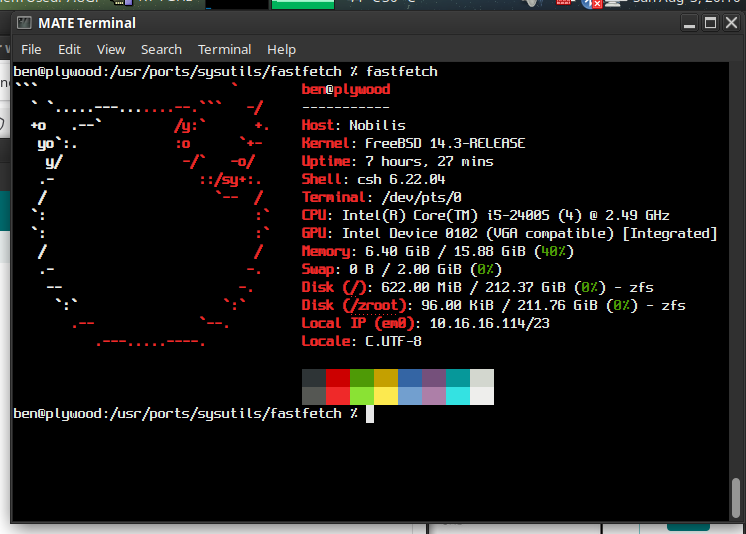

The hostname? Well, it needed a quick and dirty case… and I have no ITX cases 🙂

ben.lostgeek.net/code

MatrixTo keep things clean and organized

I’ve put most of the code I’ve shared here all up in one place. Everything has a .txt extension, so it can just be viewed in the browser, copied and pasted. There are some readme files, but they are minimal… and this is just a start; but a start is better than nothing.

Completing the Move…

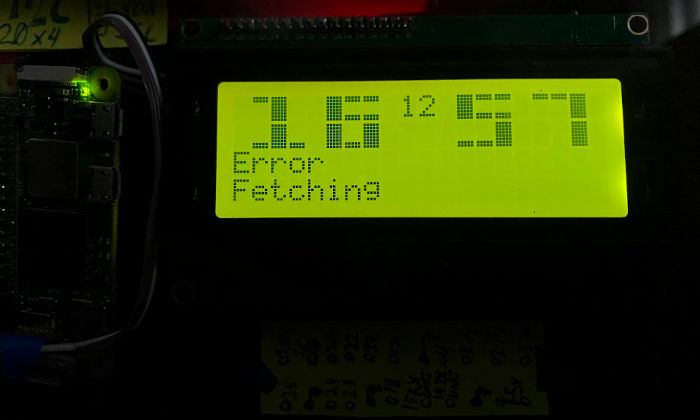
Error Fetching
PiClock couldn’t fetch weather data

Finally, 146 uninterrupted days of solid uptime, I’ve switched the site from the Pi 5 over to a Lenovo Tiny PC. Upcoming post about my new setup, involving NGINX and Alpine. I’ve been an Apache HTTPD user since 2005, but the times they are-a changing… and I think I’ve got some interesting goodies to share. Stay tuned.

In the meanwhile, if some things don’t work or are partially missing, it is because changing servers is like pulling teeth… you kind of just need to yank and get it over with.

Feel free to report via the “Forum” with bugs… I had to botch up the server stats to get it working on Alpine/NGINX because several things were a bit different. It is half done… behold, the incredibly low memory footprint of the new setup! Just 70MB!

That picture is of the PiFrame, Pi Zero 2 powered clock… it uses scripts running on my webserver — which I’d forgotten to port over to the new VM!!

Anyways, coming soon is a write up about moving to NGINX/Alpine, and the new “Big Digits” code for the PiFrame, see the picture?

Site Upgrades: Better Blogging!

I really have to say, I am absolutely impressed. Long have I been wanting some CMS to save me the hassle of building everything from scratch, but it always seemed that I’d try out something either beyond overbuilt, full of things I didn’t need and more importantly didn’t want.

WordPress seems to be the de-facto standard in this game, and for what it is, it is pretty good. But is isn’t for me.

WriteFreely seems quite different… we’ll see how things go!

© 2025 LostGeek.NET - All Rights Reserved. Powered by ClassicPress, NGINX, Debian GNU/Linux.