FreeBSD 13.5 RELEASE Available Now

FreeBSD

Doesn’t say so according to their official schedule, but 14.5 RELEASE is up on the web.

Since 14.1 or 14.2 the 14 series no longer works on my T400. Unsure exactly why, but it only boots in safemode… So, fresh 13.5 it is! According to their release schedule, RELEASE announcement isn’t until March 11th.

There is indeed an image though, in my case: FreeBSD-13.5-RELEASE-amd64-memstick.img and I’m half way through installing it right now.

Official Schedule:
https://www.freebsd.org/releases/13.5R/schedule/

13.5 Images Download (AMD64)
https://download.freebsd.org/releases/amd64/amd64/ISO-IMAGES/13.5/

Upgrade-All Script for OpenWRT

OpenWRTIn my experience, neither opkg’s command line interface, nor Luci’s web interface will allow you perform all available upgrades, all in one go.

They make you do each one, one at a time. Maybe for safety reasons?

If you accept the risks involved and want to save some time like I did, make yourself a script:

#!/bin/sh

opkg update
upgradables=$(opkg list-upgradable | awk '{print $1}') || exit 0
[ -z "$upgradables" ] && echo "No packages to upgrade." && exit 0
echo "Upgrade: $upgradables"; read -p "Enter y/n: " r
[ "$r" = "y" ] && opkg upgrade $upgradables

This is genuinely quite useful, and it also is a very good bash scripting example that I wanted to share.

Save it, chmod +x, rock and roll.

Probably should keep a copy on your workstation too, because unless you put it somewhere on the router that’ll survive reboots it may get lost during one.

Network wide ad-blocking with dnsmasq

Mask and ShieldPiHole is a thing, so is AdGuard Home— these are both excellent, and work well. They’re easy. you don’t have to be a network administrator to get up and running.

I’ve been a satisfied PiHole user for about a year, but I wanted something a little cleaner. Here is what I don’t like about PiHole:

  1. It isn’t a “normal” package. Perhaps “conventional” would be a better word; You need to use their install script. This makes updating a pain, and personally I think it is a messy way of doing things.
  2. The web interface wants to install its own server, on port 80. You can change this, and I did. Things were working fine, then I updated and the web portion no longer worked because they’ve switched to Lua… so more configuration needed, or use the web server it comes with.
  3. It is essentially just a re-release of dnsmasq, with a web front end slapped on.

So, let’s talk about doing the exact same thing, with the normal dnsmasq package that your distro comes with

IMO, the special sauce of PiHole is Stephen Black’s hosts list. This is what PH uses out of the box, to block ads, trackers and other malicious sites. Available on github here: https://github.com/StevenBlack/hosts

This file is laid out like a normal hosts file (0.0.0.0 somename.com) and we need to change that to something dnsmasq will understand. Dnsmasq needs it written like this, address=/somename.com/0.0.0.0

We can do that with a simple script. In my case, I wrote one which will grab the list for me, format it for dnsmasq and then put it in the dnsmasq.d config directory. Note, this does mean you’ll need to run with sudo, or do this in a way that you’re putting it in with the correct permission to do so.

#!/bin/bash

BLOCKLIST_URL="https://raw.githubusercontent.com/StevenBlack/hosts/master/hosts"
BLOCKLIST_FILE="/tmp/stephenblack_hosts"
OUTPUT_FILE="/etc/dnsmasq.d/100_stephenblack.conf"

# Download, process, and create dnsmasq config
wget -q -O "$BLOCKLIST_FILE" "$BLOCKLIST_URL" && \
awk '!/^#/ && NF > 1 {print "address=/" $2 "/0.0.0.0"}' "$BLOCKLIST_FILE" > "$OUTPUT_FILE" && \
systemctl restart dnsmasq && \
echo "Blocklist update and dnsmasq configuration complete!" || \
{ echo "Error occurred."; exit 1; }

Now, to get this to work, you’ll have to edit /etc/dnsmasq.conf and comment or add conf-dir=/etc/dnsmasq.d This is a massive file, so use search in your editor. Because the file is so large, make yourself a different file in dnsmasq.d called 99_custom.conf and we can put DNS related stuff in there. Here is mine, it has most of what one might want to play with dns-wise.

# Custom Configuration file for dnsmasq.
# ---------------------------------------
# These are the most relevant, DNS related options.
# All DHCP related options are in /etc/dnsmasq.conf

# To set upstream servers here; in case resolv.conf changes
no-resolv
server=1.1.1.1
server=9.9.9.9

# If you don't want dnsmasq to poll /etc/resolv.conf for changes
#no-poll

# Never forward plain names (without a dot or domain part)
domain-needed
# Never forward addresses in the non-routed address spaces.
bogus-priv

# Uncomment these to enable DNSSEC validation and caching:
# (Requires dnsmasq to be built with DNSSEC option.)
#conf-file=%%PREFIX%%/share/dnsmasq/trust-anchors.conf
#dnssec

# Replies not DNSSEC signed may be legitimate. Because the domain
# is unsigned, or may be forgeries. Dnsmasq can check unsigned replies.
#dnssec-check-unsigned

# Change this line if you want dns to get its upstream servers from
# somewhere other that /etc/resolv.conf
#resolv-file=

# Use upstream DNS server in order, or any available.
#strict-order

# Add other name servers here, (if non-public domains).
#server=/localnet/192.168.0.1

# Add local-only domains here, queries in these domains are answered
# from /etc/hosts or DHCP only.
local=/lan/

# Add domains which you want to force to an IP address here.
# This is also how ad-blocking works. (point @ 0.0.0.0)
#address=/double-click.net/127.0.0.1

# Run dnsmasq as...
#user=
#group=

# Use specific network interface, bind to LAN (only) if doing NAT.
# You don't want to make your DNS avail to the public internet.
#bind-interfaces

# Set the cache size here. Default is 100, max is 10000
cache-size=10000

# If you want to disable negative caching (non-working names)
#no-negcache

# May serve potentially stale date, you can set a custom time-to-live
local-ttl=900

# For debugging purposes, log all queries (will use many MB in a day)
#log-queries

# Good idea if you're passing out this DNS server directly to clients
addn-hosts=/etc/hosts

# Option to disable ipv6, shouldn't need to enable
#no-ipv6

I’ve got no-resolv set here, because if you tell your router to hand out this machine for DNS then it’ll get only itself as a source and well, you won’t have working DNS. So either keep no-resolv and set your upstream servers in this custom file, or make sure you’re not using anything which is going to overwrite your resolv.conf entries.

For those interested, here’s how you could deal with that:

Adding dns-nameservers 1.1.1.1 9.9.9.9 to /etc/network/interfaces (if you’re using ifupdown)

Putting supersede domain-name-servers 1.1.1.1, 9.9.9.9; into your /etc/dhcp/dhclient.conf file, should you be using dhclient for a dynamically assigned address. Good idea to do this, if you use any NICs with DHCP unless you told dnsmasq to ignore resolv.conf.

And well, I think that’s about it. The last step is going into your router, setting the machine /w dnsmasq as the DNS server… and of course, adding any names you want/need to resolve on your LAN to the DNS server’s /etc/hosts file.

Enjoy!

A fail-safe for changing network config on headless servers

Lenovo Tiny PC

I’ve been setting up a Lenvo tiny system, which came with an M.2 wifi card. I’m going to probably replace it with another Intel GB / 2.5 GB adapter at some point, but right now I don’t really have a reason to. It is always a little scary when you make major changes to your network configuration on a headless system. This box isn’t physically far away, but it is indeed tucked away in another part of the house and I have no desire to bring a monitor over to it.

I realized, the wifi could serve a purpose in case I bork the bridge config somehow, or something unexpected breaks my configuration. Because I used wifi for the Debian netinstall, ifupdown already connects to wifi on boot, so there’s my failsafe. However, I don’t want or need that to stay up after the wired network is up. So I came up with this:

@reboot sleep 60 && ping -c 3 -I br0 10.0.0.1 >/dev/null 2>&1 && ifdown wlp2s0

Put this in root’s crontab, 60 seconds after cron starts it will try to ping something on the LAN, trying three times. If it can ping successfully, we bring down our backup interface. Beautiful.

This would make even more sense with a cheap USB network adapter just to have a failsafe if you’re experimenting and don’t want to lock yourself out of a system without a monitor (or even a physical serial port, for that matter).

Fail-safe, for what? – long version, for those so-inclined

Well, I wanted to be able to easily network some VMs on this thing, so I set up bridged networking. For those who don’t know, this is how Proxmox lets your VMs basically all share a NIC and each get a DHCP lease from your main network, no double-NAT nonsense, and no need to configure static routes either. I briefly did try ProxMox on this thing, and not to talk down of it but there is a reason I don’t use it… has way too much going on out of the box that I’ll never use. It is a great product, and it definitely has its place but I like the minimal-manual style of setting things up. If I wanted to take advantage of the cluster / high availability features or ZFS snapshots then it is a great way to save you a ton of hassle manually setting up some pretty complicated stuff… But I’m not doing anything that fancy. Proxmox IMO is overkill if you just need to run a few VMs, jails or containers. It is convenient as a “poor man’s KVM” though.

Thanks to Mozilla’s PR Nightmare…

Google Warning

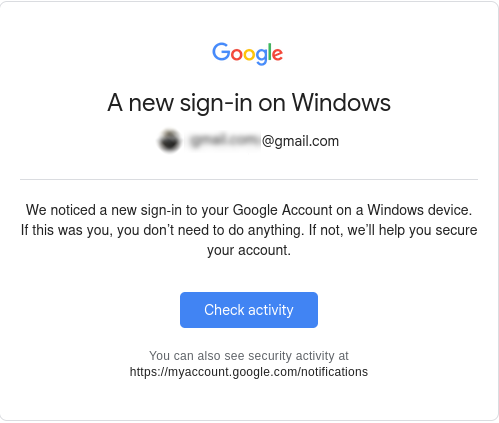
When the words “New sign in” are in the same message as “Windows”, something probably isn’t good! If you’re like me anyway

My heart just about stopped seeing a new sign in from Windows pop up as an alert. I did some digging, and quickly noticed that it must be a mistake… TLDR; it was.

Because Mozilla managed to piss off the entire internet with their new Terms of Service, updated to comply /w California law, I gave LibreWolf a spin… and signed into a google service at some point.

Much to my relief, I did NOT get hacked. Librewolf reports a Windows user-agent. Yes, even on Linux. I mean, from a privacy standpoint I don’t care & it does make sense. Linux users are only 2% – 4% of the desktop market share, so looking like another Win user is good if you want to be further anonymous.

Anyways, Louis Rossman has a really good take on the whole situation… The video is worth a watch. I’ll likely ditch FireFox in time, but this whole debacle isn’t as bad as it first seemed thankfully. Video Link

Just had to share this though… Because you know, the same thing happened to more than just me!!

Browser Crashing X.Org — Not on Alpine!

Alpine Linux
Wanted to make a note of clarifying a post I made on the former weblog back on Feb 2nd: “Firefox Crashing X11”

In that post, I explain that my T400 ThinkPad experiences X.org crashes on average once or twice a day. This was on both Debian 12, and FreeBSD 13. On FireFox from the main repo, FF ESR, and even on the latest FireFox which I went out of the way to get V134 set up on Debian Stable. I thought this fixed the problem, but I was wrong.

Pretty sure it has something to do with the machine’s ancient GMA 4500 (or the 915 driver) and some GL stuff which when it tries to run, X just immediately crashes.

Just wanted to say that I’ve been running Alpine Linux on the old ThinkPad, and my web experience has been rock solid. No more issues. I occasionally boot back into Debian, and still happening there but whatever. At some point I’ll do the necessary digging if the problem persists so I can properly report the bug.

But anyway, Debian is nice for old machines. Debian without systemd is quite light and nimble, indeed. But Alpine? Alpine is like an arrow and a feather, as one. HIGHLY recommended! I’ve been running it off a 16 GB SATA DOM in the ultra bay. https://alpinelinux.org

Site Upgrades: Better Blogging!

I really have to say, I am absolutely impressed. Long have I been wanting some CMS to save me the hassle of building everything from scratch, but it always seemed that I’d try out something either beyond overbuilt, full of things I didn’t need and more importantly didn’t want.

WordPress seems to be the de-facto standard in this game, and for what it is, it is pretty good. But is isn’t for me.

WriteFreely seems quite different… we’ll see how things go!

Firefox is Crashing X.Org on my Thinkpad T400… Why?

X.Org

Only had the issue on my T400, but it was an issue under FreeBSD 13.4 /w the FireFox/FireFox ESR available from pkg… and the same darn thing is happening with Debian Bookworm. I’m wondering if the ancient Core 2 Duo is playing a role here… (tries to do X unsupported thing… & crash. ?)

Mostly when doing a search on google… and you click a link and BAM, back to the tty. (or login greeter screen)

Not the browser crashing either, when this happens it kills the whole X server. So not cool! Luckily I didn’t loose any work when this happened, and it has happened about half a dozen times or more. Saving frequently saves the day. I thought I was getting somewhere when I saw a post about trying to disable the HW acceleration option in FF preferences, and I did try. Unfortunately though, no luck.

Something did seem to work though, using the latest FF package from Mozilla. Here is an excellent, easy to follow cut & paste to get you the latest Firefox on Debian: https://support.mozilla.org/en-US/kb/install-firefox-linux

That got me to v 134, and the problem appears to be gone.

UPDATE: THE PROBLEM STILL HAPPENS on v 134 Sorry.

My Thoughts on OpenBSD

Puffy
A completely FREE, multi-platform 4.4BSD-based UNIX-like operating system with a strong focus on proactive security and integrated cryptography.


First of all, I’m going to disclose that
I haven’t really used OpenBSD extensively for my daily computing. While I’ve installed it several times, I always ended up choosing something else in the end. I was particularly interested in trying it out on my web server and even thought about using it on my ThinkPad. The installations went smoothly, and the hardware was well-supported. These are my thoughts on OpenBSD, why I’m not using it right now and why I may use it in the future.

    Setting up OpenBSD with a graphical X11 desktop, FVWM window manager, and xenocara display manager is surprisingly easy, even for someone without any previous experience. It’s straightforward to get started, and the default security measures can be a definite plus. However, to use it effectively without these features becoming a hindrance, you need to understand the relationship between OpenBSD and their vision of a secure Unix sytem.

    When it comes to partitioning, OpenBSD’s approach to partitioning is definitely not much like your typical modern Linux distribution. If you’re used to the very simple, one size fits all with just a big root (/) and maybe a couple GB for swap, this may seem foreign. Each partition should be sized carefully.  They’ll have their own unique locked down permissions, which can enhance security. For example, an X11 installation typically remains stable in size, including a little wiggle room for updates. While all Unix-like systems use permissions, OpenBSD takes it to another level. This can be great for security but requires some learning to manage effectively.  This table from their manual page does a much better job as a visual representation than anything I could put into words.


“The exact set of partitions created depends on available free space, how fragmented the free space is and some machine dependent variables, but will be approximately (as follows)”

> 10GB Free > 2.5GB > 700MB < 700MB
/ 150MB –   1GB 800MB –   2GB 700MB –   4GB 1MB – 2GB
swap  80MB – 256MB  80MB – 256MB   1MB – 256MB
/usr 1.5GB –  30GB 1.5GB –  30GB
/home   1GB – 300GB 256MB –   2GB
/tmp 120MB –   4GB
/var  80MB –   4GB
/usr/X11R6 384MB –   1GB
/usr/local   1GB –  20GB
/usr/src   2GB –   5GB
/usr/obj   5GB –   6GB

Source: Disk Allocation, The OpenBSD Man Page
Server [
link
]


    This will be a common theme on OpenBSD. Security. You’ll definitely see that given the option, most things will take the back seat to security if the choice arises. This isn’t a bad idea, but I can see how some people get the idea you’d have to be at least a little paranoid to want an OS as locked down and granular as this one. Or Maybe I’m just a s*** sysadmin?? Never the less…

Personally, my main gripe is that I can be quite particular about certain things. I prefer not to set half a dozen just shy of a dozen static partition sizes that can’t be easily adjusted later without redoing others. I don’t want to spend hours researching and comparing just to get everything perfect! You can opt for auto-partitioning, which I recommend, but depending on your disk size, adding extra packages can be hit or miss. I did an install on a 16 GB SSD recently and found that I was quickly completely out of room after installing an additional desktop environment and web browser. I’ve used the same tiny SSD without incident on Debian and FreeBSD with many more applications installed, so it is down to the partitioning. I can’t really fault OpenBSD for this, because I’m the lazy hack that wanted auto-partitioning, but my point is some things just don’t need to be so complicated.

Installing software is straightforward, although OpenBSD has its own rules. For instance, if I recall correctly, only members of staff can allocate more than 1024 MB of memory to their processes. This detail is crucial for tasks like running a database server or even just using Firefox with multiple tabs. This is very easily changed by simply editing a config file, but it is something to be aware of.

As for customization, OpenBSD is a lean and clean OS that offers a high degree of fine-grained control for those willing to invest time in learning it. However, for my needs, FreeBSD and Linux seem to have fewer complexities, and I find it hard to justify the time required to master OpenBSD. For something like a server I could see the initial time investment paying off in return for a long and secure service life.

Some of OpenBSDs features wont appeal to everyone. For instance, hyper-threading is disabled by default to enhance security against CPU exploits related to side-channel attacks. While this is a prudent security measure, it may impact performance. OpenBSD, despite being lightweight, might be less performant than FreeBSD or Linux in similar scenarios. Nevertheless, if OpenBSD’s security model aligns with your needs, performance considerations may become less critical.

    Overall, I think OpenBSD is fantastic. However, it’s not my go-to choice for my main machine. I have considered using it for a web server where maximum performance isn’t critical, as my server typically only deals with a load at a fraction of its capacity. OpenBSD is undeniably a robust and secure Unix-like operating system, with excellent documentation and from what I’ve heard some very clean code. To those interested; I’d definitely recommend that you check it out. Ironically, in light of any complaints I have stated above it really is probably the easiest BSD system to get up and running with a full graphical desktop.


Read more about:    Operating Systems    Software

XScreenSaver Install Script for Debian MATE Desktop

XScreenSaver

MAKING IT BE (a little) LESS PAIN IN THE ASS

If you’re using Gnome/MATE screensaver (or locker), I’d recommend you don’t. Weather it is because you value X locking security, or just admit it they’re cool screensavers, toss that in the bin and install the real deal.. XScreenSaver.

I have written a script which takes care of all of the following:
1. On Debian, XScreenSaver needs you to manually specify 4 packages to get the program, “extra” savers, gl savers, and “gl extra” savers. This will get you the complete collection, as the author distributes it.
2. Remove MATE Screensaver
3. Apt pin / pref so MATE Screensaver isn’t reinstalled next time you run apt, because MATE Desktop thinks it needs it
4. Autostarts XScreenSaver
5. makes a soft link so you can still lock from the “System” menu up top, and click “Lock Screen”. Now XS will do it.

This will save me HOURS over time.

Get it here: http://lostgeek.net/files/xscreensaver-mate.sh

© 2025 LostGeek.NET - All Rights Reserved. Powered by ClassicPress, NGINX, Debian GNU/Linux.